Showing posts with label Squeezebox. Show all posts

Linux firewall settings for Apple Airplay (Shairport / Shairtunes / Shairplay)

VS. 


The following has taken me an eternity to figure out. I use Airplay from a Linux server to Apple and other airplay devices on my network. Configuring the firewall properly for this to work has not been simple - many guides are vague and lack the specifics needed.

My actual configuration centres around Logitech's squeezeboxserver now known as logitechmediaserver 'LMS' whereby I use the following plugins:

AirPlay bridge - this enables Airplay devices to be used as if they were squeezebox devices, i.e. I can play my LMS stored music / radio / spotify on any of my Airplay devices

ShairTunes2 - this enables Squeezebox devices to be Airplayed to, i.e. I can Airplay from my iPhone/iPad/Mac etc. to any of my LMS squeezebox devices. This is an incarnation of shairplay / shairport .

For along time I have had to disable my firewall to enable my LMS device to connect to my Airplay devices and for music to flow. Once the connection is established I had to then re-enable my firewall - which is not ideal and very cumbersome. Whilst the Airplay devices always showed up in LMS and LMS client the music would just not stream. 

Here's how to configure a linux firewall with UFW to enable Airplay:

Get BBC iPlayer working on Logitech Media Server with Squeezebox Touch & Classic


Getting BBC iPlayer to work on Logitech Squeezebox has not been simple in the last 18 months due to BBC's ongoing changes to their iPlayer infrastructure. Here's how I have it working as of February 2012 on a Logitech Squeezebox Plus and Logitech Squeezebox Classic, read on...

PC audio & music to Squeezebox without the hassle

I've wanted for a while to play music / all audio from my linux PC on my Squeezeboxes, with ease. I've tried in the past to do this with BPA's Squeezebox WaveInput plugin but this route isn't for the faint hearted. It also limits the audio source just to the Squeezebox Server local machine unless you are advanced. Here is a very simple method which allows you to stream from any linux PC on your network to your Squeezebox. It relies on Video Lan Client VLC, Pulseaudio and Alsa. Here's how...


Logitech Squeezebox Touch & Ubuntu 12.04 Set up


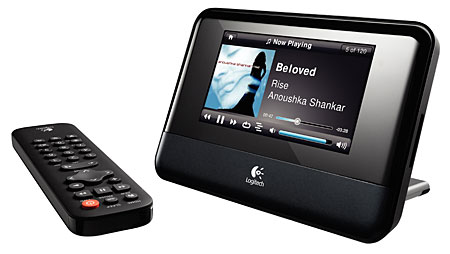
The Logitech Squeezebox Touch is an excellent, touch-screen, networked streaming network music player that features:
- a 11cm colour touch screen
- 24-bit DAC
- 802.11g Wi-Fi (WPA-2ES, WPA Personal and 64/128 bit WEP)
- 10/100Mbps Ethernet
- RCA Analgoue out
- Digital SP/DIF out
- Digital Coax out
- Supports MP3, FLAC, WAV, AIFF, WMA, Ogg Vorbis, HE-AACv2, HD-AAC, Apple Lossless, WMA Lossless, APE, MPC and WavPack (via transcoding).
Setting it up under Ubuntu 12.04 wasn't as simple as expected mainly since the wiki for Debian/Ubuntu seems to be out of date.
Here's how I got on...